Digital template for iPad & iPhone · “Year (Undated) — Modern” in the app
Undated Year — Modern Planner
Undated Year — Modern Planner: a page you write on by hand, in Nokiro™, the notebook app for iPad, iPhone and iPhone Duo. Real paper, real pens.

How to use it
Twelve little months, three by four: write the days' numbers in each and mark birthdays, holidays and deadlines with a dot or colour. Use it as the map of the year at the front of the notebook. The app reads the year, months and days.
The year at a glance: write the days' numbers in the little months.
The page, area by area
- January — Room to write, draw or stick things.
- February — Room to write, draw or stick things.
- March — Room to write, draw or stick things.
- April — Room to write, draw or stick things.
- May — Room to write, draw or stick things.
- June — Room to write, draw or stick things.
- Group
- Planning
- Format
- One page
- For
- iPad, iPhone and iPhone Duo
- Tags
- year, undated, overview, year-at-a-glance, calendar
Why not just a PDF template?
| What | A PDF in a note app | In Nokiro™ |
|---|---|---|
| Getting it | Buy it, download it, import it, link its pages by hand. | Catalog › Pages › “Year (Undated) — Modern” › Add to Notebook…: it goes where you want, in any notebook. |
| What you write | Ink on a picture of a page. | Read on your device: your handwriting is searchable, in the languages you write. |
| The notebook | A file among files, pages that scroll. | A real notebook: pages that turn under your finger, tabs, ribbons, a pocket. |
| Stickers and photos | Pasted images. | Sticker sheets you peel, washi tape, sticky notes, your photos cut out for you. |
| Price | Often paid per template. | Nokiro™ is free to download, with no account. |
Everything paper can’t do, in Nokiro™
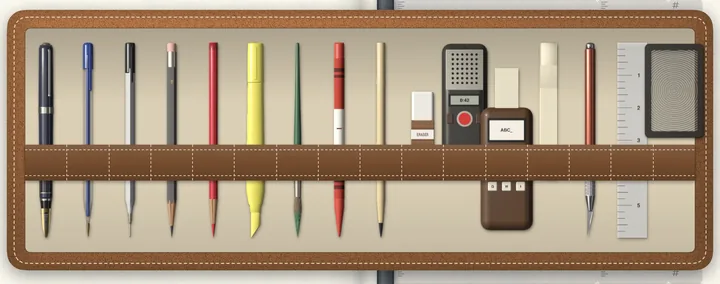
- Real pens, real paperFountain pen, fineliner, ballpoint, pencil grades, highlighters and a brush, with a finger or Apple Pencil.
- Search your handwritingOn-device AI reads every page of every notebook, in the languages you write. Print Handwriting turns it into text and keeps your hand.
- A pocket full of stickersSticker sheets you peel one by one, washi tape, sticky notes and tabs, and your own photos cut out for you.
- A recorder that listensRecord, pause, carry on; the take lands on the page as a card you play. On-device AI transcribes it in your language, offline: nothing leaves your iPad or iPhone. Imports WAV, MP3, M4A, AIFF and CAF.
- Print it, share itA PDF at true size with text you can select, or the whole notebook as a .folio file to another iPad or iPhone, by AirDrop or Files.
- Yours aloneNo account and no tracking: everything stays on your device. VoiceOver when you want it, and Reduce Motion respected.
Put Year (Undated) — Modern in your notebook
- Download Nokiro™ from the App Store and open your notebook.
- Tap Catalog, then Pages, and find “Year (Undated) — Modern”.
- Tap Add to Notebook…: choose the notebook and where it goes (here, at the front, at the end or before a section).
- Write on it with a pen or your finger, like paper.
Questions about Year (Undated) — Modern
How do I add the Year (Undated) — Modern page to my notebook?
In Nokiro™, open Catalog › Pages, tap “Year (Undated) — Modern” and Add to Notebook…. It goes into any notebook you have, with any binding, wherever you choose; the pages after it stay on their side.
Can I write on Year (Undated) — Modern with my finger?
Yes. Apple Pencil is welcome, never required: take a pen from the tray and your finger writes. Your handwriting is read on your device, so you can search it later.
Does Year (Undated) — Modern work on iPhone?
It is made for iPad, iPhone and iPhone Duo. On an ordinary iPhone Nokiro™ shows one page at a time, the size of a pocket notebook.
Is Year (Undated) — Modern a PDF template for GoodNotes or Notability?
No: it is a page of Nokiro™, a notebook app of its own, where it turns like paper and reads what you write. When you want a PDF, Export as PDF… makes one at the page’s true size, with your writing on it.
Can I print Year (Undated) — Modern?
Yes. Export as PDF… makes a PDF at the page’s true size, with your writing and any typed text you can select. Printing and sharing are always free.
Is Year (Undated) — Modern included free?
Yes. It is one of the pages that come with Nokiro™, which is free to download, with no account.
More answers in Support & FAQ, or see how it feels.


